A question we hear often: "does my USB card reader need to match the brand of tachograph fitted in the vehicle?" The short answer is no — and understanding why avoids a common and unnecessary purchase decision.
This guide focuses specifically on cross-brand compatibility for driver card and company card downloads, rather than general buying advice (see our tachograph card reader guide for that).
The key distinction: driver card vs company card downloads
There are two separate download workflows, and they behave differently when it comes to brand compatibility:
1. Driver card downloads (external reader, brand-independent)
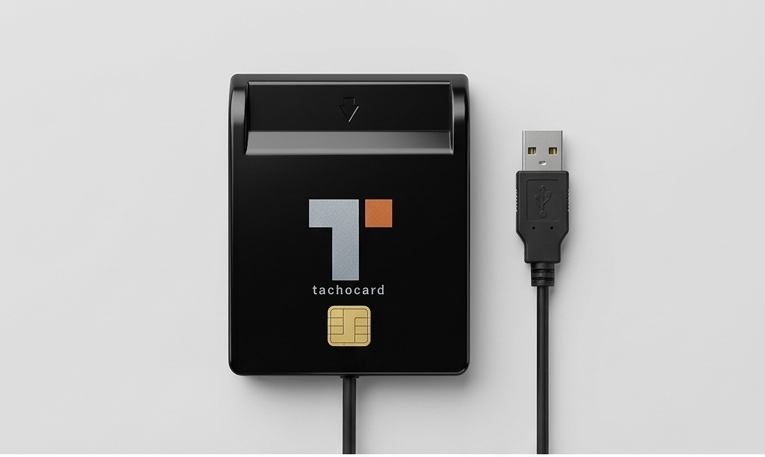
A driver card is a smart card read by an external USB or Bluetooth card reader, completely separate from the vehicle. Because the card's chip and data structure are standardised under EU Regulation (EU) No 165/2014 (and ISO/IEC 7816 for the smart card interface itself), a standards-compliant reader works with driver cards regardless of which tachograph brand issued or recorded onto them.
In other words: one USB card reader can read driver cards from a fleet running VDO, Stoneridge, Continental, and Actia vehicle units side by side, because the reader only interacts with the card's chip, not with the vehicle's tachograph unit.
2. Company card / vehicle unit downloads (brand matters more)
A company card is inserted directly into the vehicle's tachograph unit (the "VU") to authorise and export the vehicle's own stored data — not into a standalone USB reader. This is where the tachograph unit's own brand and firmware come into play, because you are interacting with:
- VDO/Continental DTCO 1381, 2.1, 3.0, and 4.0 (smart tachograph)
- Stoneridge SE5000 and SE5000 Exakt Duo²
- Actia Smartach and related models
Each of these exports data through the vehicle unit's own front USB port using the same standardised .ddd output format, but the physical download procedure (menu navigation, button sequence, download confirmation) differs slightly by brand and firmware version.
"Which company card reader works with multiple tachograph brands?"
This is a common search, and the honest answer is: there is no separate hardware device called a "company card reader" that plugs into multiple brands of vehicle unit — the company card is read by inserting it into whichever vehicle unit is fitted in that specific vehicle, and the download happens through that unit's own USB port using a standard USB cable.
What is brand-independent is the software that then reads the resulting .ddd file — TachoCard accepts standards-compliant .ddd output regardless of whether it came from a VDO, Stoneridge, or Actia vehicle unit.
"USB company card reader for tachograph data downloads"
If your fleet runs mixed tachograph brands, the practical setup is:
- For driver cards: one standards-compliant USB (or Bluetooth) card reader per office/download point — this is genuinely brand-independent and works across the whole fleet.
- For company cards / vehicle units: a standard USB cable per vehicle, connecting directly to that vehicle's own tachograph unit front port — no separate reader hardware is needed, and none would be brand-independent in the way a driver card reader is.
- For the resulting files: a single software platform (such as TachoCard) that can parse
.dddfiles from any brand, so your compliance workflow stays unified even if your vehicles don't.
Brand-specific quirks to be aware of
| Brand / Model | Front USB port | Typical quirk |
|---|---|---|
| VDO/Continental DTCO 3.0/4.0 | Yes | Menu structure changed between generations; confirm firmware version before training drivers |
| Stoneridge SE5000 / Exakt Duo² | Yes | Some early units require a firmware update to export full Gen 2 data correctly |
| Actia Smartach | Yes | Less common outside specific fleets; confirm cable/port type before rollout |
Firmware and menu details change over time — always confirm the current download procedure against your vehicle unit's own manual, since exact button sequences are outside the scope of general compatibility guidance.
Practical recommendation for mixed-brand fleets
- Standardise on one tested driver card reader model for all office/driver downloads — brand of vehicle unit does not matter here.
- Keep a standard USB cable available per vehicle for company card / vehicle unit downloads directly at the VU.
- Standardise on one software platform that ingests
.dddfiles regardless of source brand, so your reporting and infringement analysis stay consistent fleet-wide.
Frequently asked questions
Do I need a different card reader for each tachograph brand?
No, for driver cards. A standards-compliant USB or Bluetooth reader works with driver cards regardless of the vehicle unit brand that produced the vehicle-side data.
Can one reader download both driver cards and company cards?
Some readers can technically read a company card's chip data, but a company card's primary function — authorising and exporting vehicle unit data — happens by inserting it into the vehicle unit itself, not into a standalone USB reader.
Does TachoCard support files from VDO, Stoneridge, and Actia units?
Yes. TachoCard parses standards-compliant .ddd files regardless of which tachograph brand produced them.
Is there a universal "company card reader" I can buy?
Not in the sense of one device that plugs into every vehicle unit brand and downloads remotely — company card downloads happen at the vehicle unit itself. What is universal is the software used afterward to analyze the resulting files.
Related articles
- Tachograph card reader guide: USB, Android, Gen 2 compatibility
- Choosing the right tachograph card reader for your fleet
- How to download driver card data
- TachoCard features
- Compare plans and pricing
Sources: EU Regulation (EU) No 165/2014; ISO/IEC 7816.